Markdown files are the silent money pit of many LLM workflows. mdcompress strips the parts AI does not need, so your docs cost less to read.
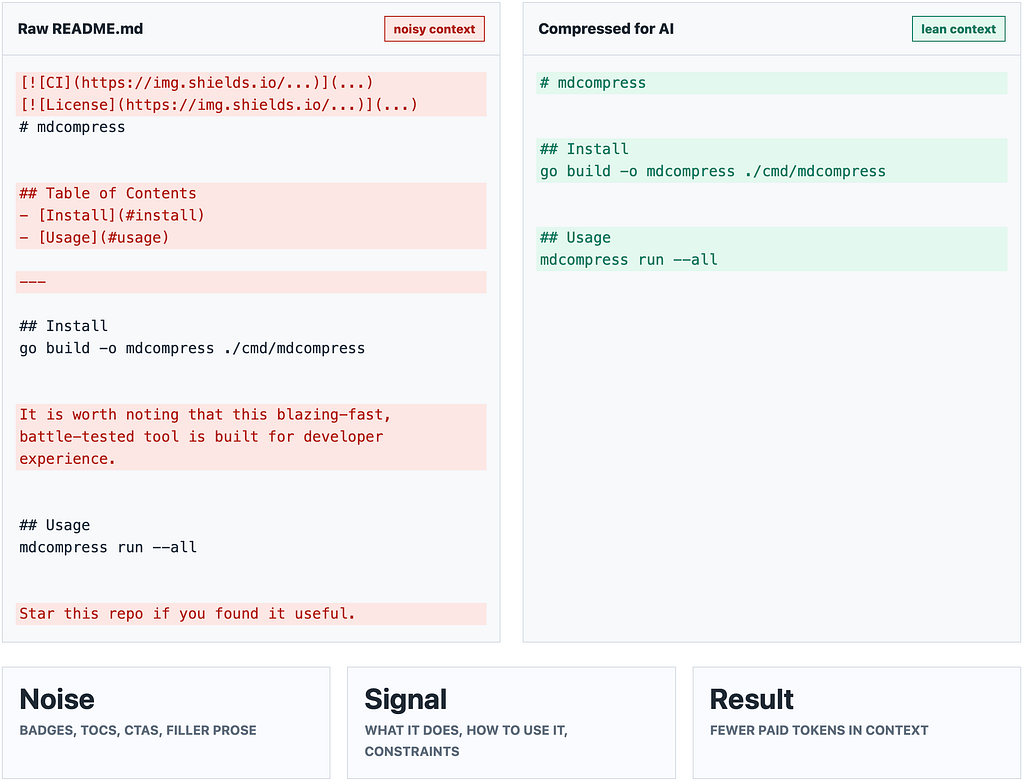
Every time an AI reads your README, it may also be reading your badge collection, your generated table of contents, your “star this repo” footer, your horizontal rules, stale metadata, decorative images, HTML comments, and the three blank lines you accidentally left in.
You pay for all of it.
A few months ago, I started paying closer attention to how much of my LLM context was going toward actual documentation versus formatting and boilerplate. The result was uncomfortable. In a typical documentation-heavy repo, a surprising amount of the token budget was going to content that carried little or no semantic value.
That is what led me to build mdcompress : a Go CLI and library that strips unnecessary markdown noise before docs are sent to an AI system.
The goal is simple:
Compression for LLMs is not about making files smaller. It is about making every token count.
The Problem: Markdown Was Written for Humans
Markdown is a great format. It is readable, portable, and everywhere. But many things that make markdown pleasant for humans are wasted tokens for an LLM.
A typical README might include:
- Shield badges for CI, license, coverage, and package versions.
- An auto-generated table of contents.
- Decorative separators.
- HTML comments left by maintainers or documentation generators.
- Marketing phrases like “blazing fast” and “battle-tested”.
- Boilerplate sections that only link to CONTRIBUTING.md or LICENSE.
- A footer asking readers to star, sponsor, or follow the project.
For a human reader, some of that is harmless polish. For an LLM, all of it becomes paid context.
A model usually needs the actual information:
- What does this project do?
- How do I install it?
- How do I use it?
- What are the important constraints?
- What are the edge cases?
Everything else increases cost and competes for attention.
Enter mdcompress
mdcompress is a CLI that prepares markdown for AI consumption.
Instead of feeding raw markdown directly into a coding agent, RAG pipeline, summarizer, or LLM workflow, you run it through mdcompress first.
mdcompress init # one-time setup in any repo
mdcompress run - all # compress every tracked .md file
mdcompress status # see cumulative token savings
mdcompress web # launch the interactive test UI
For most use cases, that is the whole surface area.
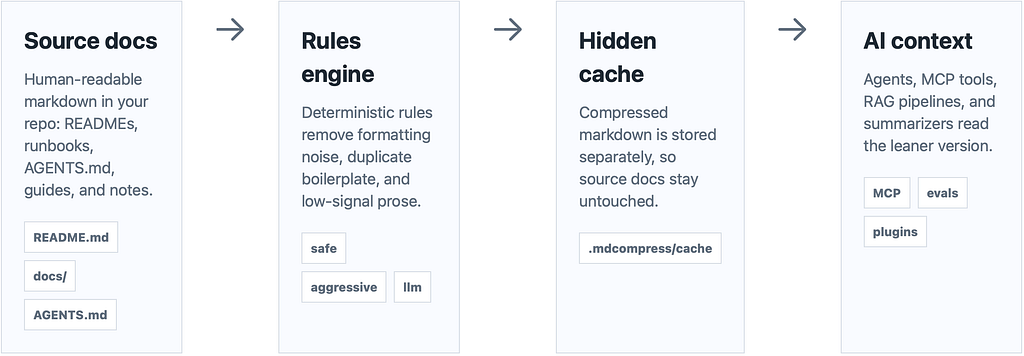
Your source markdown stays readable for humans. The compressed output lives in a hidden cache mirror and becomes the leaner version that AI tools can read.
Three Tiers, 26 Rules
Not all compression is equally risky.
Some transformations are obviously safe. Removing HTML comments, repeated blank lines, badge images, and decorative horizontal rules should not change meaning.
Other transformations are more opinionated. Removing marketing language, simplifying prose, or collapsing repeated examples can save more tokens, but they deserve more caution.
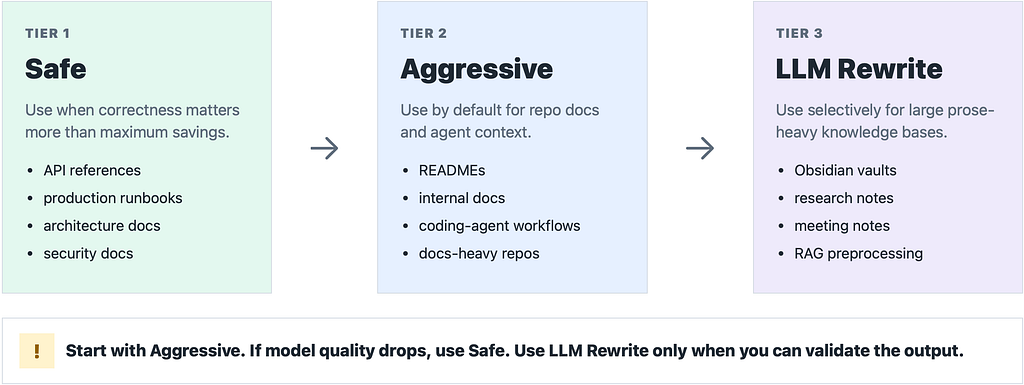
mdcompress handles this through three compression tiers.
Tier 1: Safe
Tier 1 is the conservative mode.
It focuses on deterministic transformations that are intended to preserve meaning. This is the tier to use when correctness matters more than maximum compression.
Use safe when:
- You are compressing API docs, architecture docs, production runbooks, or security docs.
- You are working in a regulated or high-risk environment.
- You want the safest mode for CI or pre-commit workflows.
- You are not sure how sensitive your docs are to wording changes.
- You notice that aggressive compression reduces model performance.
Examples of Tier 1 rules:
- strip-frontmatter : removes YAML/TOML frontmatter.
- strip-setext-headers : converts Setext headings to ATX headings.
- strip-html-comments : removes <! — … → blocks.
- compress-code-blocks : strips shell prompts and config comments from fenced code blocks.
- strip-badges : removes badge images and links.
- strip-decorative-images : removes standalone decorative images.
- strip-metadata-lines : removes lines like Last updated: and Version: .
- strip-horizontal-rules : removes decorative separator lines.
- strip-toc : removes generated table-of-contents blocks.
- strip-trailing-cta : removes star/follow/sponsor sections at the end of docs.
- collapse-blank-lines : collapses excessive blank lines.
Tier 1 is the “I want savings, but I do not want surprises” mode.
Tier 2: Aggressive
Tier 2 is the default mode.
This is where mdcompress starts removing higher-level documentation noise, not just markdown formatting noise.
Use aggressive when:
- You are feeding repo documentation to a coding agent.
- You are compressing READMEs, guides, internal docs, or knowledge-base pages.
- You want meaningful token savings without using another LLM.
- You run repeated agentic workflows where docs are read often.
- You want the best balance between savings and reliability.
Tier 2 includes everything from Tier 1, plus rules like:
- strip-html-wrappers : removes decorative HTML wrappers.
- strip-cross-file-dupes : replaces boilerplate sections shared across repo files.
- dedup-multilang-examples : collapses semantically identical multi-language examples.
- strip-marketing-prose : removes phrases like “blazing fast” and “battle-tested”.
- strip-hedging-phrases : removes phrases like “it is worth noting that” and “in order to”.
- dedup-cross-section : removes intro sentences duplicated in body sections.
- strip-benchmark-prose : removes prose that only narrates an adjacent table.
- strip-admonition-prefixes : removes Note: , Warning: , and Tip: prefixes where the prefix itself adds no value.
- strip-cross-references : removes filler references like “See the X section for details.”
- strip-verification-boilerplate : removes verification chitchat around examples.
- strip-seo-chaff : removes breadcrumbs, previous/next links, and “Was this helpful?” prompts.
- compress-changelogs : compacts changelog sections.
- compact-tables : removes delimiter rows and extra whitespace from pipe tables.
Two aggressive rules are opt-in even at Tier 2:
- strip-boilerplate-sections
- collapse-example-output
That is intentional. Some projects treat contributing, support, license, or example output sections as important context. mdcompress can remove them, but it does not assume that every repo wants that behavior by default.
This is the tier I expect most people to use most of the time.
That said, token savings are only useful if the model still understands the material correctly. If you notice worse answers, weaker code edits, or more confusion from your LLM after aggressive compression, drop back to safe.
The practical rule is:
Start with aggressive. If model quality drops, use safe.
Tier 3: LLM Rewrite
Tier 3 is different.
Instead of only applying deterministic rules, this mode uses an LLM to rewrite sections into a more compact form. It can produce larger reductions, but it is also the tier that needs the most validation.
This is not the tier I would use blindly on source-code documentation.
It is better suited for large, prose-heavy knowledge bases where repetition, narrative phrasing, and loosely structured notes dominate the corpus.
Use llm when:
- You have an Obsidian vault.
- You have long personal notes.
- You have research notes, meeting notes, or internal knowledge-base pages.
- You have verbose documentation written mostly for humans, not machines.
- You are preparing a large markdown corpus for retrieval or summarization.
- You are willing to run evals and inspect the output.
I would not make Tier 3 the default for a codebase. It is powerful, but it should be used intentionally.
The safest mental model is:
Use llm for knowledge-heavy prose, not for blindly rewriting critical technical docs.
The Number That Made Me Ship It
When I ran mdcompress across a representative set of documentation files, the savings were large enough to matter.
The exact percentage depends on the document type. READMEs with badges, generated tables of contents, repeated boilerplate, and marketing copy compress well. Dense API references compress less, but they still benefit from whitespace cleanup, metadata removal, and formatting normalization.
The important part is not just the one-time reduction.
It is the compounding effect.
If a coding agent reads your documentation every time it reloads context, retries a task, spawns a sub-agent, or builds a summary, every unnecessary token gets paid for repeatedly.
A 20–30% reduction in documentation tokens may not sound dramatic on one file. Across dozens of files and hundreds of agent runs, it adds up quickly.
The goal was never to make documentation unreadable. It was to remove the parts that were already unread by both humans and models.
Keeping the Workflow Invisible
The most useful compression step is the one you do not have to think about.
After setup, mdcompress keeps compressed copies of your markdown in .mdcompress/cache/ . Your original files stay untouched and human-friendly. The AI-facing versions stay lean.
A typical config looks like this:
version: 1
tier: aggressive
rules:
 enabled: []
 disabled:
  - dedup-cross-section
  - collapse-example-output
  - strip-boilerplate-sections
eval:
 backend: ollama
 model: llama3.1:8b
 threshold: 0.95
 questions_per_doc: 10
mdcompress init creates the config, installs hooks, updates agent hints where supported, and runs an initial compression pass. From there, mdcompress run keeps the hidden cache mirror fresh.
The source docs remain human docs.
The cache becomes model-facing docs.
MCP Server: Let the Agent Read Compressed Markdown Directly
mdcompress also includes an MCP server, so compatible coding agents can request compressed markdown directly.
The server exposes three tools:
read_markdown(path)
compress_text(content, tier?)
compress_url(url)
Run it with:
mdcompress serve
Or initialize MCP config with:
mdcompress init - mcp
With this setup, an agent can read compressed documentation without changing how you work. The compression happens at the boundary where the model asks for context.
That is the part I find most interesting: markdown compression becomes part of the model input pipeline, not another manual cleanup task for developers.
Faithfulness Matters More Than Compression
The biggest risk with any compression system is silent degradation.
Saving tokens is easy if you are willing to delete important information. The hard part is saving tokens without changing what the document means.
That is why mdcompress includes an eval workflow:
mdcompress eval - repo=.
mdcompress eval - repo=docs - rule=strip-toc
The eval command generates factual questions for each document, answers them against both the original and compressed versions, then uses a judge model to score whether the answers remain equivalent.
This matters especially for aggressive and LLM-based compression. If a compressed document becomes cheaper but less reliable, that is not optimization. That is data loss.
The principle is:
Never trust compression just because the file got smaller. Verify that the meaning survived.
Plugin API: Bring Your Own Rules
Every organization has its own documentation noise.
Maybe your docs include internal tracking headers. Maybe every runbook has the same compliance footer. Maybe your team uses a custom metadata block that means nothing to an LLM.
mdcompress supports custom rules through a plugin interface.
External binaries named like mdcompress-rule-* are auto-discovered on your PATH. A plugin reports metadata with — plugin-info, then transforms markdown through stdin and stdout.
That means you can write custom compressors in Bash, Python, Rust, Go, or whatever fits your workflow.
Which Tier Should You Use?
Here is the practical version.
Use safe when correctness is the priority.
Good for:
- API references.
- Production runbooks.
- Architecture docs.
- Security docs.
- Compliance-heavy documentation.
- Cases where aggressive compression reduces model quality.
Use aggressive by default.
Good for:
- Repo READMEs.
- Coding-agent context.
- Internal engineering docs.
- General markdown cleanup.
- Repeated LLM workflows.
- Documentation-heavy repos.
Use llm selectively.
Good for:
- Obsidian vaults.
- Long-form notes.
- Research collections.
- Meeting notes.
- Large prose-heavy knowledge bases.
- RAG preprocessing when you can run evals.
My recommendation:
Start with aggressive.
Measure the output.
If quality drops, use safe.
Use llm only when the corpus is prose-heavy and you can validate it.
Try It
For now, the easiest way to try it is to clone the repo and build the CLI locally:
git clone https://github.com/dhruv1794/mdcompress.git
cd mdcompress
go build -o mdcompress ./cmd/mdcompress
Then move the binary somewhere on your PATH:
mkdir -p ~/.local/bin
mv ./mdcompress ~/.local/bin/
export PATH="$HOME/.local/bin:$PATH"
If you want that PATH change to persist, add the export line to your shell config, such as ~/.zshrc or ~/.bashrc.
For ZSH users:
echo ‘export PATH=”$HOME/.local/bin:$PATH”’ >> ~/.zshrc
source ~/.zshrc
For Bash users:
echo 'export PATH="$HOME/.local/bin:$PATH"' >> ~/.bashrc
source ~/.bashrc
Then run it in any repo/folder that consist of md files:
mdcompress init
mdcompress run - all
mdcompress status
There is also an interactive benchmark and test page:
https://dhruv1794.github.io/mdcompress/
You can paste markdown, select a tier, inspect the diff, and see token and byte savings.
The source code is available here:
https://github.com/dhruv1794/mdcompress
Help Shape It
mdcompress is still early, and I would like it to grow around real workflows rather than only my own assumptions.
If you try it on your docs and find a pattern it should handle better, open an issue. If your codebase has a kind of markdown noise that the existing rules do not catch, fork the repo and send a PR. New rules, better heuristics, benchmark cases, docs improvements, and bug reports are all useful.
I am especially interested in contributions around:
- New compression rules for real-world documentation patterns.
- More LLM adapters and eval backends.
- Better defaults for agent workflows.
- Better benchmark corpora across READMEs, runbooks, API docs, and knowledge bases.
- More examples of custom plugin rules.
Right now the LLM and eval paths support local and cloud backends, and I plan to add a Bedrock adapter soon. If your team uses another provider or has a different workflow, that is exactly the kind of use case I would like the project to support.
Closing Thought
I built mdcompress because I was tired of watching token budgets disappear into content that neither I nor the AI needed.
The best compression is the kind you barely notice. Your source docs still read well. Your model still gets the information it needs. The context just gets cheaper.
If your workflow involves feeding markdown to an LLM, especially in coding agents, RAG pipelines, or documentation summarizers, it is worth measuring how much of that markdown is actually signal.
You may be surprised by how much you can remove without losing meaning.